Cart abandonment doesn’t have one universal cause; it has at least four common ones. Treating it as a single problem means applying a generic fix, a discount popup, a countdown timer, to whatever the actual cause happens to be, which only sometimes helps. The useful first step is diagnosing which specific cause is driving abandonment on your store, not applying a fix built for a different one.
Key takeaways
- Cart abandonment doesn’t have one universal cause. It has at least four common ones: cost surprise, forced friction, trust gap, and technical breakdown, and each needs a different fix.
- Applying a generic fix (a discount popup, an urgency banner) to whatever cause happens to be real on your store is why the same tactic works dramatically well on one site and barely moves the number on another.
- Diagnose before you fix: funnel drop-off by exact step, session recordings of abandoners, new-vs-returning segmentation, and mobile-vs-desktop comparison each help narrow down the real cause.
- Unexpected shipping cost (a cost-surprise cause) and forced account creation (a forced-friction cause) are two of the most common single causes I see in practice, and each has a specific, non-obvious fix.
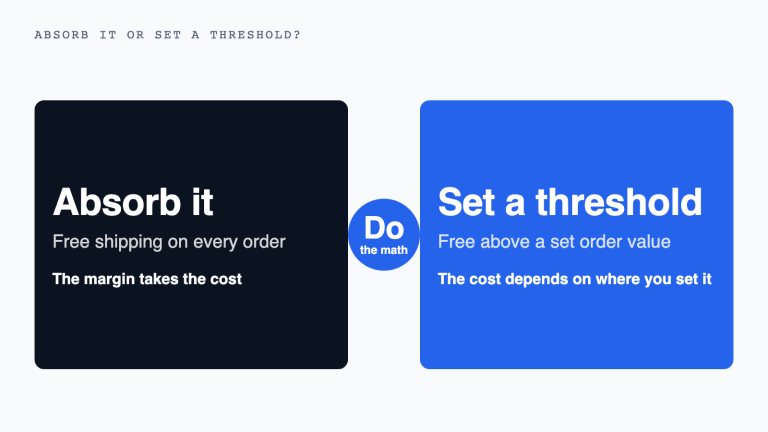
- If your checkout shows a late cost surprise, fix its visibility first, before deciding whether to absorb the cost or set a threshold. That ordering matters regardless of which pricing option you land on.
Is this actually your problem right now?
This guide covers diagnosing which of four common causes is driving cart abandonment, then applying the cause-specific fix. It doesn’t cover every reason a visitor never converts.
Stop reading here if:
- You already know exactly which step is broken. This is a diagnostic method for when you don’t yet know which cause applies, not a build ticket for a known bug.
- Your cart-to-purchase rate is fine and the problem is upstream, visitors never adding to cart at all. That’s a different funnel stage.
If carts are being built and abandoned and you’re not sure why, the sections below are the right starting point.
Why the generic fixes have inconsistent results
A store where abandonment is driven by unexpected shipping costs and a store where it’s driven by a broken mobile checkout step look identical in the top-line abandonment metric: both show a high percentage of carts that never convert. But the fix for one does nothing for the other. That’s why the same tactic, a discount incentive, an urgency banner, works dramatically well on one store and barely moves the number on another. It was never addressing the actual cause where it underperformed; it was addressing a symptom that happens to look the same across every store, regardless of what’s actually breaking underneath it.
This is also why comparing your abandonment rate to an industry benchmark rarely tells you what to do next. Two stores can post the identical top-line number for entirely different reasons, and only one of them is fixed by the same tactic. The rate tells you abandonment is happening (Baymard Institute’s aggregate of 50 studies puts the industry average around 70%, per a 2026-08-23 check of their published figures); it doesn’t tell you which of the causes below is responsible, and that’s the piece a benchmark can never supply.
How do you diagnose which cause is actually driving it?
Four checks, run together, narrow down which cause is real on your store before you commit to a fix.
- Funnel drop-off by exact step, not an overall cart-to-purchase rate. Concentrated at the shipping-cost reveal, it’s a pricing-transparency cause; at account creation or a specific field, it’s a friction cause. Spread evenly, it points to something more fundamental: trust, or a mismatch between what was expected and what checkout asks for.
- Session recordings of abandoners specifically, not converters. Watching where someone hesitates or backs out right before leaving confirms the mechanism, not just the location.
- Segmenting by new versus returning customer. Account-creation friction hits new customers harder; shipping cost or payment options tend to affect both equally.
- Mobile versus desktop abandonment rate on the same traffic. A meaningful gap points to a device-specific usability cause rather than a pricing or trust cause.
What the four causes actually look like once isolated
| Cause | Signal in the data | The fix |
|---|---|---|
| Cost surprise (shipping, taxes, fees revealed late) | Drop-off right where the total price changes, usually shipping or payment. | Show the real cost earlier, before checkout. |
| Forced friction (mandatory account creation, too many fields) | Drop-off at that specific step, disproportionately among new customers. | Remove or defer the step; make the fast path the default. |
| Trust gap (no security signal, unclear return policy at payment) | Drop-off right before payment entry, with no clear cost or friction event to explain it. | Add the missing signal at the exact point of hesitation. |
| Technical/usability breakdown (a step that fails on a specific device or browser) | A mobile-vs-desktop or browser-specific gap on otherwise identical traffic. | Fix the broken interaction; test on the actual device and browser. |
Fix the specific cause the evidence points to, not all four preemptively. A cost-surprise cause is solved by showing the full cost earlier, not by urgency messaging. A friction cause is solved by removing or deferring the specific field or step, not by a discount. Applying the wrong category of fix is why generic cart-abandonment advice has such inconsistent real-world results: it’s solving for an assumed cause instead of the confirmed one.
Cost surprise and forced friction are the two causes I run into most often, so they’re worth walking through in full below. Trust gap and technical breakdown follow the same diagnostic logic; the table above is the starting point for either.
Cost surprise: when the shipping charge shows up too late
An unexpected shipping charge at checkout is one of the most common and most fixable versions of a cost-surprise cause. You’re ready to pay, a shipping charge you didn’t expect lands, and the deal suddenly feels bad enough to close the tab over. Your customers do exactly the same thing.
Why does this specific surprise kill so many carts? Because the cost shows up too late, after the shopper has already decided to buy and built a mental price for the purchase. In my experience diagnosing checkouts, extra costs that appear late, shipping, tax, and fees, are the single biggest avoidable reason a ready buyer walks away (experience-based observation from my own checkout diagnostic work, not a universal statistic; industry-wide, Baymard Institute attributes 40% of non-browsing abandonments to this cause, per a 2026-08-23 check of their published figures). It’s less a pricing problem than a timing-and-expectation one, and years of free-shipping-by-default retail have set an expectation that a good deal includes not paying to ship it; you don’t have to like that, but you do have to price and present around it.
Does that mean you have to offer free shipping on everything? No, it’s a lever, not an obligation, and the math has to work for your margin. Absorbing shipping across the board removes the trigger in one move. If you can’t, a free-shipping threshold, “free on orders over a set amount,” is often better anyway: it gives shoppers a path to free shipping and nudges average order value up as people add an item to clear the bar. Set it just above your typical order value, from real order data, not a competitor’s number.
How should you present it so it actually works? Tell people early: a free-shipping offer only changes behavior before checkout, ideally before they add to cart. Put it in the header, on product and cart pages, and in email and ad campaigns, so there’s no surprise waiting at checkout.
The sequencing insight most guides skip
Before deciding between absorbing shipping cost or setting a threshold, score your situation on three questions:
- What’s your average order value today? A threshold set just above it nudges orders up without feeling out of reach; set too far above it, shoppers ignore it.
- What does shipping cost you per order, and can your margin absorb it across the board? If yes, absorbing it removes the surprise in one move, no threshold to manage.
- Where does shipping cost currently first appear to the shopper? Header or product page is early and visible; cart or checkout only is late, and this is the fix to make first, regardless of which option you choose on questions 1 and 2.
If question 3 comes back “checkout only,” fix the visibility first. That alone removes most of the late-surprise effect before you’ve even decided between absorbing cost or setting a threshold, and it’s free and immediate compared to the margin math the other two questions require. The businesses that get this cause right almost always start with question 3, not question 1 or 2, because visibility costs nothing to fix and the absorb-or-threshold decision can follow once the bleeding has already stopped.
Forced friction: when checkout demands an account before it demands a sale
Forcing account creation before checkout is one of the most common and most expensive versions of a forced-friction cause: it breaks a shopper’s buying momentum right when they’ve decided to pay. Many online stores still put up this wall at the worst possible moment.
Why does forcing account creation cost you sales? A shopper who has decided to buy wants to pay and move on. Asking them to register first breaks that momentum, and a share abandon the cart instead: inventing a password, handing over details they didn’t plan to share, remembering one more login they’ll probably forget. This isn’t a fringe problem: a large share of stores still interrupt shoppers to push account creation before or during checkout (experience-based observation from the checkouts I’ve reviewed, not a measured industry figure; industry-wide, Baymard Institute attributes 18% of non-browsing abandonments to forced account creation specifically, per a 2026-09-05 recheck of their published figures). Every interruption risks a customer who was already reaching for their wallet.
What does current checkout research show? Baymard’s checkout usability research names forced account creation as one of the recurring causes of checkout abandonment and recommends guest checkout as the default path, with account creation offered afterward on the confirmation page rather than as a gate (Baymard Institute, “Make ‘Guest Checkout’ Prominent,” checked 2026-09-05). The same research notes that a guest checkout option only helps if a shopper actually sees it: their e-commerce benchmark found 47% of sites fail to make guest checkout the most prominent option at the account-selection step, so it gets missed even where it technically exists. “If a user fails to see the guest checkout option, it’s as bad as if it wasn’t offered at all.”
Three distinct patterns show up under the “forced friction” umbrella, and they need different fixes:
- Forced registration. No guest path exists at all; an account is a hard requirement to complete the order. This is the wall itself.
- Hidden guest checkout. A guest option exists but is a text link buried below account sign-in, not a visible button, so most shoppers never find it. Baymard’s own benchmark work is the basis for treating this as functionally equivalent to not offering guest checkout.
- Premature account invitation. No hard requirement, but the account prompt interrupts the flow before the order is placed, adding a decision point at the moment a shopper is trying to finish paying.
Accounts themselves aren’t the problem. Customer accounts are genuinely useful: stored addresses and payment methods for faster repeat checkout, order history, easier returns, and loyalty or rewards programs all depend on one. The goal isn’t eliminating accounts, it’s not gatekeeping the transaction with one. An account offered at the right moment is a convenience a lot of returning customers want; the same account required before the first purchase is a wall between a ready buyer and a completed sale.
Doesn’t guest checkout mean giving up on your marketing list? No, but keep the two email asks separate. Every checkout, guest or not, needs a transactional email: the address the order confirmation, receipt, and shipping updates go to. That’s not optional and it’s not a marketing ask, it’s how the order gets fulfilled. Marketing-consent email, permission to send future offers and promotions, is a distinct, separate opt-in and should be presented as its own checkbox or step, not bundled silently into the transactional field. This isn’t just a UX preference: under the US CAN-SPAM Act, a transactional or relationship message (a receipt, a shipping update) is a distinct category from a commercial message, and having a customer’s email from a transaction does not by itself create permission to send them promotional email (FTC, “CAN-SPAM Act: A Compliance Guide for Business,” checked 2026-09-05). Under the UK’s Privacy and Electronic Communications Regulations (PECR), sending marketing email generally requires consent; the “soft opt-in” exception only covers an existing customer who bought or negotiated to buy a similar product or service, was given a clear chance to opt out when their details were collected, and gets an opt-out in every message since (ICO, “Guidance on direct marketing using electronic mail: soft opt-in,” checked 2026-09-05). Neither rule treats “we have their email from the order” as equivalent to “they agreed to promotional email.” Pre-checking a marketing box, or treating “we have their email” as the same thing as “they agreed to promotional email,” is a consent problem, not a checkout-friction one; see consent-state drift for what happens when that distinction gets blurred downstream. Getting the transactional email at guest checkout still gets you the sale and the address; whether you also get permission to market to it is a separate question with a separate answer governed by the applicable consent rules, not a proxy you get for free from checkout.
What should you do instead? Make guest checkout the default, fast path for shoppers who aren’t already signed in, not buried beneath a login form, and invite account creation after the purchase is complete, on the confirmation page, where it costs nothing. Returning customers who are already authenticated should still get the fast, pre-filled express-checkout experience an account enables; the fix targets the anonymous-shopper path, not the returning-customer one. By then the sale is locked in, and “save your details for next time” reads as a convenience instead of a barrier.
How to implement delayed account creation well. The confirmation-page invitation only reads as a convenience if it behaves like one. Don’t make the shopper re-enter the name, email, and address they already gave you during checkout, prefill the account form from the order. A passwordless or account-link pattern, a one-tap “claim this account” link sent to the order email, or a magic-link sign-in, removes the “invent a password” friction entirely instead of just moving it to a later screen.
When guest checkout is not this simple. A few categories genuinely need an account or verified identity before or during the transaction, and forcing guest checkout onto them would be the wrong fix: digital products or services with ongoing account-based delivery, subscriptions, B2B or wholesale orders governed by a negotiated contract, member-only commerce, and regulated purchases that require identity verification. Even in these cases, the same principle still applies in a smaller form: minimize what the account setup asks for, and explain to the shopper why identity or an account is necessary before asking for it, rather than presenting it as an unexplained gate.
The principle underneath both causes is the same one: when a visitor has decided to act, your job is to remove friction or surprise, not add it. An unexpected shipping charge is friction wearing a price tag; a forced account wall is friction wearing a login form.
The Guest Checkout Check
Skip the additive scoring above for a simple yes/no diagnostic. Any “no” answer below is a real wall between a ready buyer and a completed sale, and unlike the cost-surprise fix, it needs no margin math to fix, just moving where the account prompt sits:
- Can an anonymous shopper complete a purchase without creating an account? If no, that’s forced registration, the wall itself.
- Is the guest-checkout path as visible and easy to find as the account-creation option? If no, that’s a hidden guest checkout, functionally the same problem even if guest checkout technically exists.
- Is account creation delayed until after the order is placed, not offered as an interruption during checkout? If no, that’s a premature account invitation.
- Does the account-creation step ask only for information the order didn’t already provide? If no, the account form is adding friction the transaction itself never needed.
A “yes” on all four means the account step isn’t costing you sales. Any “no” identifies exactly which of the three failure patterns above is live on your checkout, and which fix to apply first.
What not to do yet
Don’t add a blanket discount or urgency mechanism as a default fix before the diagnostic step. If the actual cause is a trust gap or a technical breakdown, a discount doesn’t address either one; it just makes the abandonment slightly less costly, without fixing why it’s happening. The same caution applies inside the two sub-cases above: don’t set a free-shipping threshold to fix a forced-account-creation problem, or make guest checkout the default to fix a late shipping-cost reveal. They’re different causes, and the fixes don’t transfer.
It’s also worth resisting the urge to fix all four at once “just in case.” Shipping a threshold, a guest-checkout default, a trust badge, and a mobile bug fix in the same release makes it impossible to tell afterward which change actually moved the number, and some of those changes carry real cost (margin, engineering time) that a confirmed-wrong cause doesn’t justify spending.
Don’t A/B test whether removing a forced-registration wall helps at all, that’s a settled usability question backed by external checkout research, not an open one. Spend the experiment budget on the tradeoffs that are genuinely unresolved for your store instead: how much guest checkout affects account adoption and repeat-purchase rate, whether it changes fraud or chargeback exposure, and what it does to downstream support and fulfillment operations. If you do run that test, track a primary metric of completed orders per eligible checkout starter, with account-creation rate, average order value, fraud/chargeback rate, and repeat-purchase behavior as guardrails so a gain on one doesn’t hide a loss on another.
What to do next
- Pull checkout drop-off at each specific step, not an overall cart-to-purchase rate.
- Watch session recordings of abandoners, and segment by new-vs-returning and mobile-vs-desktop.
- If cost surprise is the pattern, fix visibility first, before absorbing cost or setting a threshold.
- If forced friction is the pattern, run the Guest Checkout Check: make the guest path the default and as visible as account creation, and move any account invitation to after purchase.
- Keep transactional email (order confirmation) and marketing-consent email separate, and follow the consent rules that apply to your customers, don’t treat one as proof of the other.
Alex’s Perspective
Cost surprise and forced friction, the two causes I diagnose most often, share the same underlying mistake: something the store needed got scheduled ahead of something the shopper wanted, at the exact moment the shopper was ready to pay. Every audit starts with step-by-step drop-off, not a top-line number, because that number can’t tell you where the real break is.
Where this fits
This article addresses the Discover and Experiment stages of the Experience Optimization Framework. It diagnoses which distinct cause is driving cart abandonment on a given store, then tests the cause-specific fix, visibility, threshold, or guest checkout, against real order and funnel data rather than applying a generic tactic on faith.
Diagnosing what’s actually driving your cart abandonment, instead of guessing at a fix for a problem you haven’t located, is exactly what ecommerce optimization work is for.
Frequently Asked Questions
What if I genuinely can’t afford to offer free shipping at all?
Be transparent instead of hiding the cost. Showing it clearly on the product or cart page, well before checkout, removes the surprise even when the charge itself doesn’t go away.
Do I lose the shopper’s shipping address for remarketing if they check out as a guest?
No, but keep transactional and marketing use separate. Guest checkout still collects the shipping address and email needed to fulfill the order; what it skips is the password and account step, not the order data itself. Using that same email for remarketing is a separate, opt-in decision, not something the transactional collection grants automatically. See consent-state drift for the mechanics of keeping that distinction intact once the data reaches your marketing tools.
Can more than one of the four causes be driving abandonment at once?
Yes, and step-by-step funnel data usually still separates them. A late shipping reveal on one step and a broken mobile payment field on another concentrate at two different points, each getting its own fix.
Written by Alex Harris. View My Résumé